> ## Documentation Index
> Fetch the complete documentation index at: https://auth0-feat-sdk-reference-docs.mintlify.site/llms.txt
> Use this file to discover all available pages before exploring further.
> Use the Mailjet email provider integration with Flows to send emails.
# MailJet
## Configure your MailJet Vault Connection
Learn how to configure a Vault Connection for your MailJet Flow Actions at [MailJet Vault Connection](/docs/customize/forms/vaults/mailjet).
## Send email
Send an email using Mailjet as the email provider.
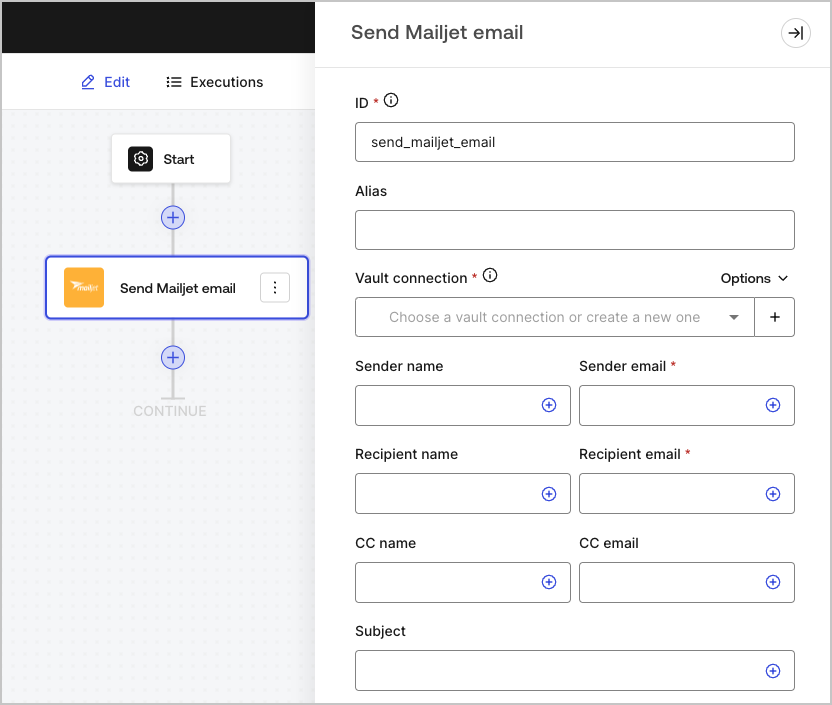 ### Input settings
| Parameter | Description |
| - | - |
| Sender name | The sender's name |
| Sender email (required) | The sender's email |
| Recipient name | The recipient's name |
| Recipient email (required) | The recipient's email |
| CC name | The CC name |
| CC email | The CC email |
| Subject | The email subject |
| Email type | Send email with HTML content or using a saved template (optional) |
| Message (required) | Email message in HTML format or a template (optional). |
| Template ID (optional) | If using a template, its ID can be found at [ Mailjet's dashboard ](https://app.mailjet.com/template). |
| Custom variables (optional) | Add custom variables to be inserted in your template. |
| Track email activity | Check box to track email activity. |
### Output object
You can find the expected response and status codes at [Mailjet's documentation](https://dev.mailjet.com/email/reference/send-emails/).
### Input settings
| Parameter | Description |
| - | - |
| Sender name | The sender's name |
| Sender email (required) | The sender's email |
| Recipient name | The recipient's name |
| Recipient email (required) | The recipient's email |
| CC name | The CC name |
| CC email | The CC email |
| Subject | The email subject |
| Email type | Send email with HTML content or using a saved template (optional) |
| Message (required) | Email message in HTML format or a template (optional). |
| Template ID (optional) | If using a template, its ID can be found at [ Mailjet's dashboard ](https://app.mailjet.com/template). |
| Custom variables (optional) | Add custom variables to be inserted in your template. |
| Track email activity | Check box to track email activity. |
### Output object
You can find the expected response and status codes at [Mailjet's documentation](https://dev.mailjet.com/email/reference/send-emails/).